
2026 实战指南:如何构建 AI 驱动的国际化 (i18n) 现代 Web 应用
结合 Lingui 与 AI 翻译构建多语言 Web 应用的实战指南。基于 Next.js、Claude 和 T3 Turbo,自动实现 17 种语言支持。

Title: 咱们得聊聊 2026 年的国际化 (i18n) 了 Excerpt: 大多数教程还在教你手动翻译或用蹩脚的 API。但在 Claude Sonnet 4.5 时代,我们用 Next.js + Lingui + AI 构建了一套能流利说 17 种语言的生产级架构。别再像 2019 年那样做翻译了。
听着,咱们得聊聊 2026 年的国际化 (i18n) 了。
大多数教程会告诉你去手动翻译字符串,雇佣翻译人员,或者使用一些蹩脚的 Google 翻译 API。但问题是:你现在生活在 Claude Sonnet 4.5 的时代。为什么还要像 2019 年那样做翻译?
我要向你展示我们是如何构建一个能流利说 17 种语言的生产级 Web 应用的,我们使用了一个真正合理的两部分 i18n 架构:
- Lingui 负责提取、编译和运行时的魔法
- 一个自定义 i18n 包 由大语言模型 (LLM) 驱动,用于自动化的、上下文感知的翻译
我们的技术栈?Create T3 Turbo 搭配 Next.js, tRPC, Drizzle, Postgres, Tailwind 以及 AI SDK。如果你 2026 年还没用这套栈,那咱们得另找时间好好唠唠了。
开始构建吧。
传统 i18n 的问题
传统的 i18n 工作流通常是这样的:
# 提取字符串
$ lingui extract

# ??? 莫名其妙地获取翻译 ???
# (雇翻译,用不靠谱的服务,崩溃大哭)

# 编译
$ lingui compile
中间那一步?简直是噩梦。你要么:
- 花大价钱请人工翻译(慢,贵)
- 使用基础的翻译 API(缺乏上下文,听起来像机器人)
- 手动翻译(根本无法扩展)
我们有更好的办法。
两部分架构
这是我们的配置:
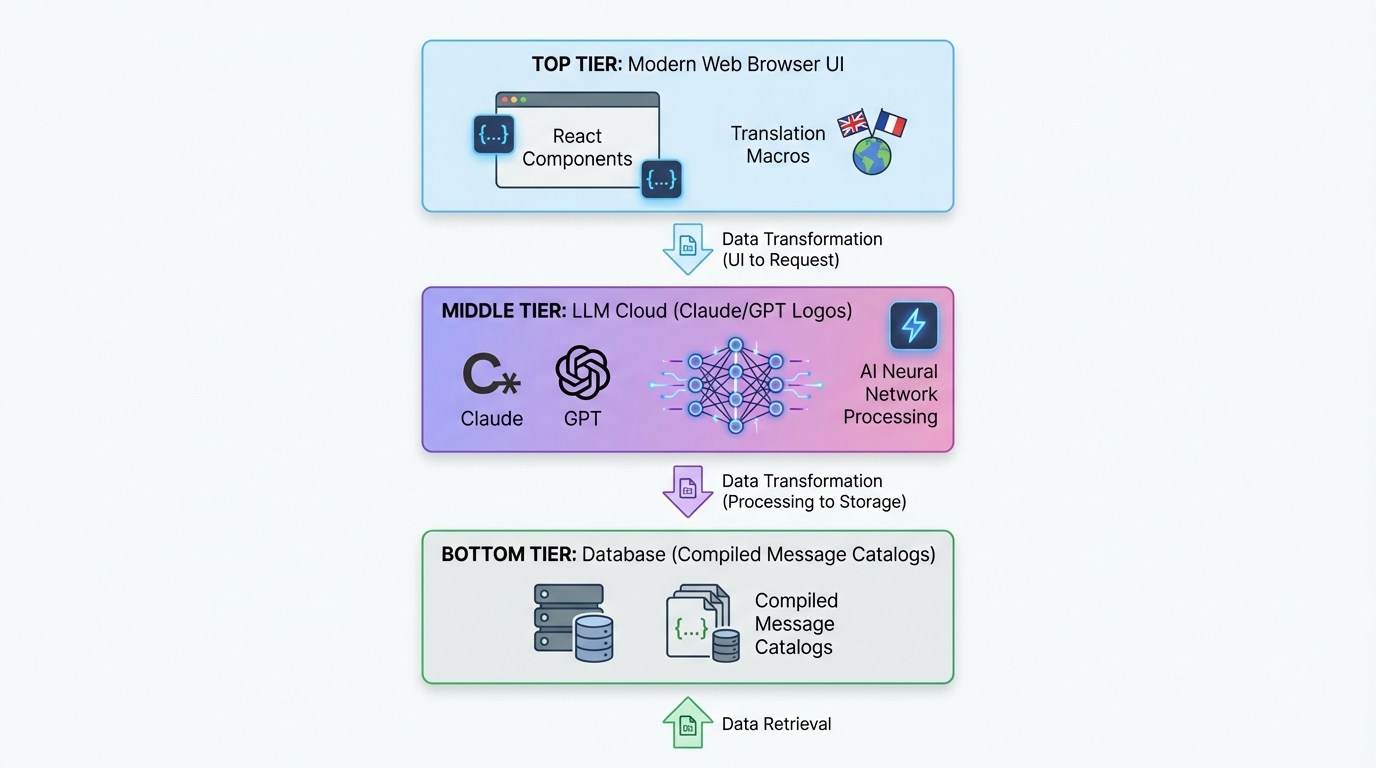
┌─────────────────────────────────────────────┐
│  Next.js App (Lingui 集成)                 │
│  ├─ 使用宏提取字符串                         │
│  ├─ 代码中的 Trans/t 组件                   │
│  └─ 使用编译后的目录进行运行时 i18n           │
└─────────────────────────────────────────────┘
              ↓ 生成 .po 文件
┌─────────────────────────────────────────────┐
│  @acme/i18n Package (LLM 翻译)             │
│  ├─ 读取 .po 文件                           │
│  ├─ 使用 Claude/GPT-5 批量翻译               │
│  ├─ 上下文感知,产品专用                      │
│  └─ 写入翻译后的 .po 文件                    │
└─────────────────────────────────────────────┘
              ↓ 编译为 TypeScript
┌─────────────────────────────────────────────┐
│  编译后的消息目录 (Message Catalogs)          │
│  └─ 快速、类型安全的运行时翻译                │
└─────────────────────────────────────────────┘
第一部分 (Lingui) 处理开发者体验。 第二部分 (自定义 i18n 包) 处理翻译魔法。
让我们深入了解每一个部分。
第一部分:在 Next.js 中设置 Lingui
安装
在你的 T3 Turbo monorepo 中:
# 在 apps/nextjs 目录下
pnpm add @lingui/core @lingui/react @lingui/macro
pnpm add -D @lingui/cli @lingui/swc-plugin
Lingui 配置
创建 apps/nextjs/lingui.config.ts:
import type { LinguiConfig } from "@lingui/conf";

const config: LinguiConfig = {
  locales: [
    "en", "zh_CN", "zh_TW", "ja", "ko",
    "de", "fr", "es", "pt", "ar", "it",
    "ru", "tr", "th", "id", "vi", "hi"
  ],
  sourceLocale: "en",
  fallbackLocales: {
    default: "en"
  },
  catalogs: [
    {
      path: "<rootDir>/src/locales/{locale}/messages",
      include: ["src"],
    },
  ],
};

export default config;
开箱即用支持 17 种语言。 为什么不呢?
Next.js 集成
更新 next.config.js 以使用 Lingui 的 SWC 插件:
const linguiConfig = require("./lingui.config");

module.exports = {
  experimental: {
    swcPlugins: [
      [
        "@lingui/swc-plugin",
        {
          // 这会让你的构建更快
        },
      ],
    ],
  },
  // ... 其他配置
};
服务端设置
创建 src/utils/i18n/appRouterI18n.ts:
import { setupI18n } from "@lingui/core";
import { allMessages } from "./initLingui";

const locales = ["en", "zh_CN", "zh_TW", /* ... */] as const;

const instances = new Map<string, ReturnType<typeof setupI18n>>();

// 为所有语言预创建 i18n 实例
locales.forEach((locale) => {
  const i18n = setupI18n({
    locale,
    messages: { [locale]: allMessages[locale] },
  });
  instances.set(locale, i18n);
});

export function getI18nInstance(locale: string) {
  return instances.get(locale) ?? instances.get("en")!;
}
为什么要这样做? 服务端组件 (Server Components) 没有 React Context。这能让你在服务端进行翻译。
客户端 Provider
创建 src/providers/LinguiClientProvider.tsx:
"use client";

import { I18nProvider } from "@lingui/react";
import { setupI18n } from "@lingui/core";
import { useEffect, useState } from "react";

export function LinguiClientProvider({
  children,
  locale,
  messages
}: {
  children: React.ReactNode;
  locale: string;
  messages: any;
}) {
  const [i18n] = useState(() =>
    setupI18n({
      locale,
      messages: { [locale]: messages },
    })
  );

  useEffect(() => {
    i18n.load(locale, messages);
    i18n.activate(locale);
  }, [locale, messages, i18n]);

  return <I18nProvider i18n={i18n}>{children}</I18nProvider>;
}
在 layout.tsx 中包裹你的应用:
import { LinguiClientProvider } from "@/providers/LinguiClientProvider";
import { getLocale } from "@/utils/i18n/localeDetection";
import { allMessages } from "@/utils/i18n/initLingui";

export default function RootLayout({ children }: { children: React.ReactNode }) {
  const locale = getLocale();

  return (
    <html lang={locale}>
      <body>
        <LinguiClientProvider locale={locale} messages={allMessages[locale]}>
          {children}
        </LinguiClientProvider>
      </body>
    </html>
  );
}
在代码中使用翻译
在服务端组件中:
import { msg } from "@lingui/core/macro";
import { getI18nInstance } from "@/utils/i18n/appRouterI18n";

export async function generateMetadata({ params }) {
  const locale = getLocale();
  const i18n = getI18nInstance(locale);

  return {
    title: i18n._(msg`Pricing Plans | acme`),
    description: i18n._(msg`Choose the perfect plan for you`),
  };
}
在客户端组件中:
"use client";

import { Trans, useLingui } from "@lingui/react/macro";

export function PricingCard() {
  const { t } = useLingui();

  return (
    <div>
      <h1><Trans>Pricing Plans</Trans></h1>
      <p>{t`Ultimate entertainment experience`}</p>

      {/* 带变量的情况 */}
      <p>{t`${credits} credits remaining`}</p>
    </div>
  );
}
宏语法 (Macro syntax) 是关键。 Lingui 会在构建时提取这些内容。
第二部分:AI 驱动的翻译包
这才是最精彩的部分。
包结构
创建 packages/i18n/:
packages/i18n/
├── package.json
├── src/
│   ├── translateWithLLM.ts      # 核心 LLM 翻译逻辑
│   ├── enhanceTranslations.ts   # 批量处理器
│   └── utils.ts                 # 辅助工具
package.json
{
  "name": "@acme/i18n",
  "version": "0.1.0",
  "dependencies": {
    "@acme/ai": "workspace:*",
    "openai": "^4.77.3",
    "pofile": "^1.1.4",
    "zod": "^3.23.8"
  }
}
LLM 翻译引擎
这是秘制酱料 —— translateWithLLM.ts:
import { openai } from "@ai-sdk/openai";
import { generateText } from "ai";
import { z } from "zod";

const translationSchema = z.object({
  translations: z.array(
    z.object({
      msgid: z.string(),
      msgstr: z.string(),
    })
  ),
});

export async function translateWithLLM(
  messages: Array<{ msgid: string; msgstr: string }>,
  targetLocale: string,
  options?: { model?: string }
) {
  const prompt = `You are a professional translator for acme, an AI-powered creative platform.

Translate the following strings from English to ${getLanguageName(targetLocale)}.

CONTEXT:
- acme is a platform for AI chat, image generation, and creative content
- Keep brand names unchanged (acme, Claude, etc.)
- Preserve HTML tags, variables like {count}, and placeholders
- Adapt culturally where appropriate
- Maintain tone: friendly, creative, engaging

STRINGS TO TRANSLATE:
${JSON.stringify(messages, null, 2)}

Return a JSON object with this structure:
{
  "translations": [
    { "msgid": "original", "msgstr": "translation" },
    ...
  ]
}`;

  const result = await generateText({
    model: openai(options?.model ?? "gpt-4o"),
    prompt,
    temperature: 0.3, // 越低 = 越一致
  });

  const parsed = translationSchema.parse(JSON.parse(result.text));
  return parsed.translations;
}

function getLanguageName(locale: string): string {
  const names: Record<string, string> = {
    zh_CN: "Simplified Chinese",
    zh_TW: "Traditional Chinese",
    ja: "Japanese",
    ko: "Korean",
    de: "German",
    fr: "French",
    es: "Spanish",
    pt: "Portuguese",
    ar: "Arabic",
    // ... 等等
  };
  return names[locale] ?? locale;
}
为什么这行得通:
- 上下文感知:LLM 知道 acme 是什么。
- 结构化输出:Zod schema 确保 JSON 有效。
- 低温度 (Low temperature):保证翻译的一致性。
- 保留格式:HTML、变量保持原样。
批量翻译处理器
创建 enhanceTranslations.ts:
import fs from "fs";
import path from "path";
import pofile from "pofile";
import { translateWithLLM } from "./translateWithLLM";

const BATCH_SIZE = 30; // 每次翻译 30 个字符串
const DELAY_MS = 1000; // 速率限制

export async function enhanceTranslations(
  locale: string,
  catalogPath: string
) {
  const poPath = path.join(catalogPath, locale, "messages.po");
  const po = pofile.parse(fs.readFileSync(poPath, "utf-8"));

  // 查找未翻译的项目
  const untranslated = po.items.filter(
    (item) => item.msgid && (!item.msgstr || item.msgstr[0] === "")
  );

  if (untranslated.length === 0) {
    console.log(`✓ ${locale}: All strings translated`);
    return;
  }

  console.log(`Translating ${untranslated.length} strings for ${locale}...`);

  // 批量处理
  for (let i = 0; i < untranslated.length; i += BATCH_SIZE) {
    const batch = untranslated.slice(i, i + BATCH_SIZE);
    const messages = batch.map((item) => ({
      msgid: item.msgid,
      msgstr: item.msgstr?.[0] ?? "",
    }));

    try {
      const translations = await translateWithLLM(messages, locale);

      // 更新 PO 文件
      translations.forEach((translation, index) => {
        const item = batch[index];
        if (item) {
          item.msgstr = [translation.msgstr];
        }
      });

      console.log(`  ${i + batch.length}/${untranslated.length} translated`);

      // 保存进度
      fs.writeFileSync(poPath, po.toString());

      // 速率限制
      if (i + BATCH_SIZE < untranslated.length) {
        await new Promise((resolve) => setTimeout(resolve, DELAY_MS));
      }
    } catch (error) {
      console.error(`  Error translating batch: ${error}`);
      // 继续下一批
    }
  }

  console.log(`✓ ${locale}: Translation complete!`);
}
批量处理 可以防止达到 Token 限制并节省成本。
翻译脚本
创建 apps/nextjs/script/i18n.ts:
import { enhanceTranslations } from "@acme/i18n";
import { exec } from "child_process";
import { promisify } from "util";

const execAsync = promisify(exec);

const LOCALES = [
  "zh_CN", "zh_TW", "ja", "ko", "de",
  "fr", "es", "pt", "ar", "it", "ru"
];

async function main() {
  // 第一步:从代码中提取字符串
  console.log("📝 Extracting strings...");
  await execAsync("pnpm run lingui:extract --clean");

  // 第二步:自动翻译缺失的字符串
  console.log("\n🤖 Translating with AI...");
  const catalogPath = "./src/locales";

  for (const locale of LOCALES) {
    await enhanceTranslations(locale, catalogPath);
  }

  // 第三步:编译为 TypeScript
  console.log("\n⚡ Compiling catalogs...");
  await execAsync("npx lingui compile --typescript");

  console.log("\n✅ Done! All translations updated.");
}

main().catch(console.error);
添加到 package.json:
{
  "scripts": {
    "i18n": "tsx script/i18n.ts",
    "lingui:extract": "lingui extract",
    "lingui:compile": "lingui compile --typescript"
  }
}
运行你的 i18n 管道
# 一个命令搞定所有
$ pnpm run i18n

📝 Extracting strings...
Catalog statistics for src/locales/{locale}/messages:
┌──────────┬─────────────┬─────────┐
│ Language │ Total count │ Missing │
├──────────┼─────────────┼─────────┤
│ en       │         847 │       0 │
│ zh_CN    │         847 │     123 │
│ ja       │         847 │      89 │
└──────────┴─────────────┴─────────┘

🤖 Translating with AI...
Translating 123 strings for zh_CN...
  30/123 translated
  60/123 translated
  90/123 translated
  123/123 translated
✓ zh_CN: Translation complete!

⚡ Compiling catalogs...
✅ Done! All translations updated.
就是这么简单。 在代码里加个新字符串,运行 pnpm i18n,Boom —— 瞬间翻译成 17 种语言。

语言切换
别忘了用户体验 (UX) 部分。这是一个语言切换器:
"use client";

import { useLocaleSwitcher } from "@/hooks/useLocaleSwitcher";
import { useLocale } from "@/hooks/useLocale";

const LOCALES = {
  en: "English",
  zh_CN: "简体中文",
  zh_TW: "繁體中文",
  ja: "日本語",
  ko: "한국어",
  // ... 等等
};

export function LocaleSelector() {
  const currentLocale = useLocale();
  const { switchLocale } = useLocaleSwitcher();

  return (
    <select
      value={currentLocale}
      onChange={(e) => switchLocale(e.target.value)}
    >
      {Object.entries(LOCALES).map(([code, name]) => (
        <option key={code} value={code}>
          {name}
        </option>
      ))}
    </select>
  );
}
Hook 的实现:
// hooks/useLocaleSwitcher.tsx
"use client";

import { setUserLocale } from "@/utils/i18n/localeDetection";

export function useLocaleSwitcher() {
  const switchLocale = (locale: string) => {
    setUserLocale(locale);
    window.location.reload(); // 强制刷新以应用语言设置
  };

  return { switchLocale };
}
将偏好存储在 Cookie 中:
// utils/i18n/localeDetection.ts
import { cookies } from "next/headers";

export function setUserLocale(locale: string) {
  cookies().set("NEXT_LOCALE", locale, {
    maxAge: 365 * 24 * 60 * 60, // 1 年
  });
}

export function getLocale(): string {
  const cookieStore = cookies();
  return cookieStore.get("NEXT_LOCALE")?.value ?? "en";
}
进阶:类型安全的翻译
想要类型安全?Lingui 也能满足你:
// 别这样写:
t`Hello ${name}`

// 使用 msg 描述符:
import { msg } from "@lingui/core/macro";

const greeting = msg`Hello ${name}`;
const translated = i18n._(greeting);
你的 IDE 会自动补全翻译键值。简直完美。
性能考量
1. 构建时编译
Lingui 将翻译编译为压缩后的 JSON。没有运行时解析开销。
// 编译输出 (压缩后):
export const messages = JSON.parse('{"ICt8/V":["视频"],"..."}');
2. 预加载服务端目录
在启动时加载所有目录一次(见上面的 appRouterI18n.ts)。每次请求无需文件 I/O。
3. 客户端包体积
只向客户端发送当前活跃的语言包:
<LinguiClientProvider
  locale={locale}
  messages={allMessages[locale]} // 只发送一种语言
>
4. LLM 成本优化
- 批量翻译:每次 API 调用处理 30 个字符串
- 缓存翻译:不要重新翻译未更改的字符串
- 使用更便宜的模型:对于非关键语言使用 GPT-4o-mini
我们的成本?800+ 字符串 × 16 种语言,大约 2-3 美元。相比人工翻译,这点钱简直是九牛一毛。
全栈集成
让我们看看这如何与 T3 Turbo 的其他部分配合:
tRPC 与 i18n
// server/api/routers/user.ts
import { createTRPCRouter, publicProcedure } from "../trpc";
import { msg } from "@lingui/core/macro";

export const userRouter = createTRPCRouter({
  subscribe: publicProcedure
    .mutation(async ({ ctx }) => {
      // 错误信息也可以被翻译!
      if (!ctx.session?.user) {
        throw new TRPCError({
          code: "UNAUTHORIZED",
          message: ctx.i18n._(msg`You must be logged in`),
        });
      }

      // ... 订阅逻辑
    }),
});
通过 context 传递 i18n 实例:
// server/api/trpc.ts
import { getI18nInstance } from "@/utils/i18n/appRouterI18n";

export const createTRPCContext = async (opts: CreateNextContextOptions) => {
  const locale = getLocale();
  const i18n = getI18nInstance(locale);

  return {
    session: await getServerAuthSession(),
    i18n,
    locale,
  };
};
数据库与 Drizzle
存储用户语言偏好:
// packages/db/schema/user.ts
import { pgTable, text, varchar } from "drizzle-orm/pg-core";

export const users = pgTable("user", {
  id: varchar("id", { length: 255 }).primaryKey(),
  locale: varchar("locale", { length: 10 }).default("en"),
  // ... 其他字段
});
AI SDK 集成
即时翻译 AI 的响应:
import { openai } from "@ai-sdk/openai";
import { generateText } from "ai";
import { useLingui } from "@lingui/react/macro";

export function useAIChat() {
  const { i18n } = useLingui();

  const chat = async (prompt: string) => {
    const systemPrompt = i18n._(msg`You are a helpful AI assistant for acme.`);

    return generateText({
      model: openai("gpt-4"),
      messages: [
        { role: "system", content: systemPrompt },
        { role: "user", content: prompt },
      ],
    });
  };

  return { chat };
}
我们学到的最佳实践
1. 永远使用宏 (Macros)
// ❌ 坏习惯:运行时翻译 (不会被提取)
const text = t("Hello world");

// ✅ 好习惯:宏 (构建时提取)
const text = t`Hello world`;
2. 上下文就是一切
为翻译人员(或 AI)添加注释:
// i18n: This appears in the pricing table header
<Trans>Monthly</Trans>

// i18n: Button to submit payment form
<button>{t`Subscribe Now`}</button>
Lingui 会将这些提取为翻译注释。
3. 正确处理复数
import { Plural } from "@lingui/react/macro";

<Plural
  value={count}
  one="# credit remaining"
  other="# credits remaining"
/>
不同语言有不同的复数规则。Lingui 能搞定。
4. 日期/数字格式化
使用 Intl API:
const date = new Intl.DateTimeFormat(locale, {
  dateStyle: "long",
}).format(new Date());

const price = new Intl.NumberFormat(locale, {
  style: "currency",
  currency: "USD",
}).format(29.99);
5. RTL (从右到左) 支持
对于阿拉伯语,处理方向:
export default function RootLayout({ children }) {
  const locale = getLocale();
  const direction = locale === "ar" ? "rtl" : "ltr";

  return (
    <html lang={locale} dir={direction}>
      <body>{children}</body>
    </html>
  );
}
添加到 Tailwind 配置:
module.exports = {
  plugins: [
    require('tailwindcss-rtl'),
  ],
};
使用方向性类名:
<div className="ms-4"> {/* margin-start, 同时适用于 LTR/RTL */}
部署检查清单
在你发布之前:
- 运行
pnpm i18n确保所有翻译都是最新的 - 在生产模式下测试每种语言
- 验证语言 Cookie 的持久性
- 检查阿拉伯语的 RTL 布局
- 测试语言切换器的用户体验
- 添加 hreflang 标签以优化 SEO
- 如果需要,设置基于语言的路由
- 监控 LLM 翻译成本
结果
实施这套系统后:
- 开箱即用支持 17 种语言
- ~850 个字符串 自动翻译
- 总成本 2-3 美元 完成全量翻译
- 2 分钟更新周期 当添加新字符串时
- 零人工翻译工作
- 上下文感知的高质量翻译
对比一下:
- 人工翻译:每字 0.10-0.30 美元 = 1000 美元以上
- 传统服务:依然昂贵,依然缓慢
- 手动工作:根本无法扩展
为什么这在 2026 年很重要
听着,互联网是全球性的。如果你在 2026 年还只发布英文版,你就放弃了世界上 90% 的用户。
但传统的 i18n 真的很痛苦。这种方法让它变得微不足道:
- 用 Trans/t 宏写代码(耗时 2 秒)
- 运行
pnpm i18n(自动化) - 发布给全世界(坐等收益)
Lingui 的开发者体验 + LLM 驱动的翻译 的结合是一个颠覆性的改变。你将获得:
- 类型安全的翻译
- 零运行时开销
- 自动提取
- 上下文感知的 AI 翻译
- 每种语言只需几分钱
- 无限扩展
更进一步
想再提升一个档次?试试这些:
动态内容翻译
将翻译存储在数据库中:
// packages/db/schema/content.ts
export const blogPosts = pgTable("blog_post", {
  id: varchar("id", { length: 255 }).primaryKey(),
  titleEn: text("title_en"),
  titleZhCn: text("title_zh_cn"),
  titleJa: text("title_ja"),
  // ... 等等
});
保存时自动翻译:
import { translateWithLLM } from "@acme/i18n";

export const blogRouter = createTRPCRouter({
  create: protectedProcedure
    .input(z.object({ title: z.string() }))
    .mutation(async ({ input }) => {
      // 翻译成所有语言
      const translations = await Promise.all(
        LOCALES.map(async (locale) => {
          const result = await translateWithLLM(
            [{ msgid: input.title, msgstr: "" }],
            locale
          );
          return [locale, result[0].msgstr];
        })
      );

      await db.insert(blogPosts).values({
        id: generateId(),
        titleEn: input.title,
        ...Object.fromEntries(translations),
      });
    }),
});
用户提供的翻译
让用户提交更好的翻译:
export const i18nRouter = createTRPCRouter({
  suggestTranslation: publicProcedure
    .input(z.object({
      msgid: z.string(),
      locale: z.string(),
      suggestion: z.string(),
    }))
    .mutation(async ({ input }) => {
      await db.insert(translationSuggestions).values(input);

      // 通知维护者
      await sendEmail({
        to: "i18n@acme.com",
        subject: `New translation suggestion for ${input.locale}`,
        body: `"${input.msgid}" → "${input.suggestion}"`,
      });
    }),
});
翻译的 A/B 测试
测试哪种翻译转化率更高:
const variant = await abTest.getVariant("pricing-cta", locale);

const ctaText = variant === "A"
  ? t`Start Your Free Trial`
  : t`Try acme Free`;
代码
所有这些都是来自真实应用的生产级代码。完整的实现都在我们的 monorepo 中:
t3-acme-app/
├── apps/nextjs/
│   ├── lingui.config.ts
│   ├── src/
│   │   ├── locales/           # 编译后的目录
│   │   ├── utils/i18n/        # i18n 工具
│   │   └── providers/         # LinguiClientProvider
│   └── script/i18n.ts         # 翻译脚本
└── packages/i18n/
    └── src/
        ├── translateWithLLM.ts
        ├── enhanceTranslations.ts
        └── utils.ts
写在最后
在 2026 年构建一个多语言 AI 应用不再困难。工具都已经准备好了:
- Lingui 负责提取和运行时
- Claude/GPT 负责上下文感知翻译
- T3 Turbo 提供业内最佳的 DX
别再花几千刀做翻译了。别再把你的应用限制在英语世界了。
全球化构建。快速发布。使用 AI。
这就是我们在 2026 年的做法。
有问题?有 Issue?在 Twitter 上找我,或者查看 Lingui 文档 和 AI SDK 文档。
现在,去发布那个多语言应用吧。世界在等着你。
分享
作者 Feng Liu
shenjian8628@gmail.com