
How to Build an i18n AI-Powered Modern Webapp in 2026
Complete guide to building multilingual webapps with Lingui + AI translations. Support 17 languages automatically using Next.js, Claude, and T3 Turbo.


Look, we need to talk about i18n in 2026.
Most tutorials will tell you to manually translate strings, hire translators, or use some janky Google Translate API. But here's the thing: you're living in the Claude Sonnet 4.5 era. Why are you translating like it's 2019?
I'm going to show you how we built a production webapp that speaks 17 languages fluently, using a two-piece i18n architecture that actually makes sense:
- Lingui for the extraction, compilation, and runtime magic
- A custom i18n package powered by LLMs for automated, context-aware translations
Our stack? Create T3 Turbo with Next.js, tRPC, Drizzle, Postgres, Tailwind, and the AI SDK. If you're not using this in 2026, we need to have a different conversation.
Let's build.
The Problem With Traditional i18n
Traditional i18n workflows look like this:
# Extract strings
$ lingui extract

# ??? Somehow get translations ???
# (hire translators, use sketchy services, cry)

# Compile
$ lingui compile
That middle step? It's a nightmare. You're either:
- Paying $$$ for human translators (slow, expensive)
- Using basic translation APIs (context-blind, sounds robotic)
- Manually translating (doesn't scale)
We're doing better.
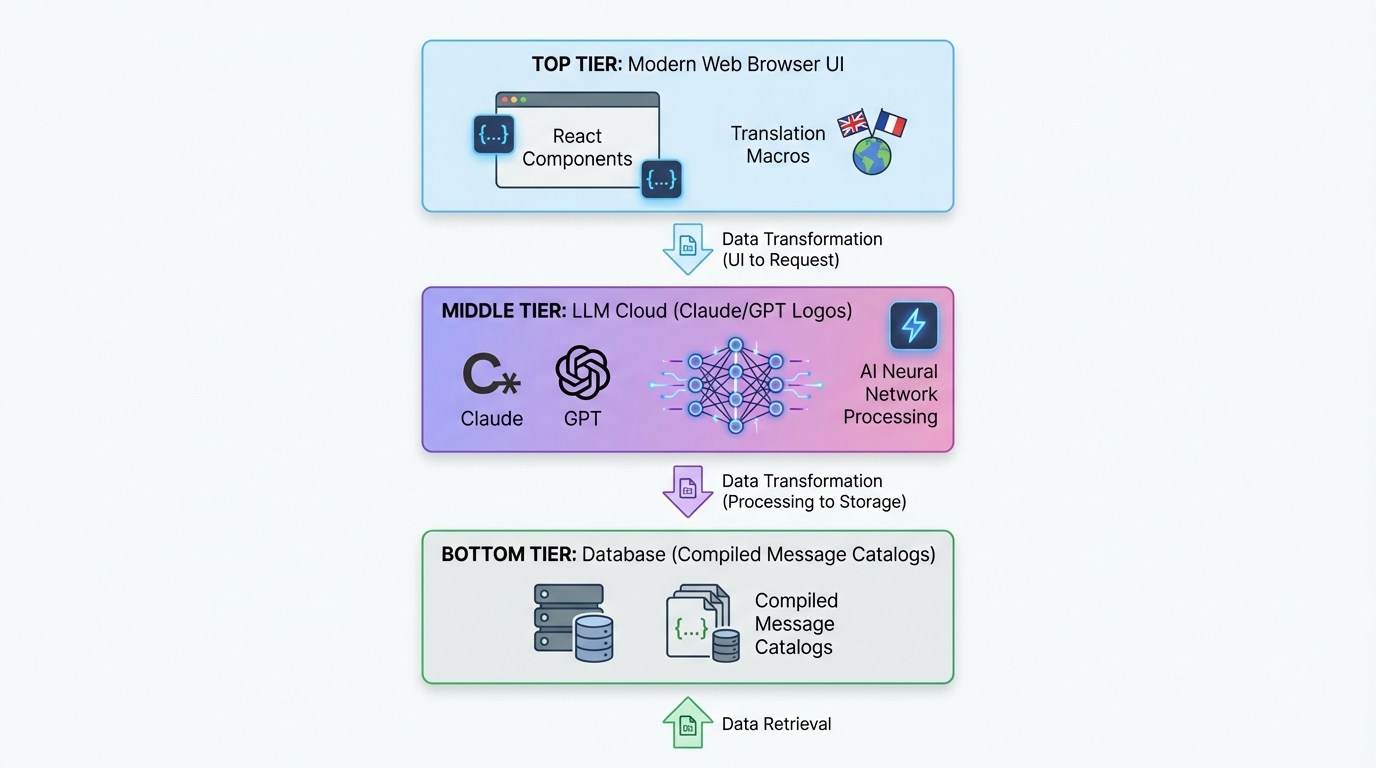
The Two-Piece Architecture
Here's our setup:
┌─────────────────────────────────────────────┐
│  Next.js App (Lingui Integration)          │
│  ├─ Extract strings with macros             │
│  ├─ Trans/t components in your code         │
│  └─ Runtime i18n with compiled catalogs     │
└─────────────────────────────────────────────┘
              ↓ generates .po files
┌─────────────────────────────────────────────┐
│  @acme/i18n Package (LLM Translation)     │
│  ├─ Reads .po files                         │
│  ├─ Batch translates with Claude/GPT-5      │
│  ├─ Context-aware, product-specific         │
│  └─ Writes translated .po files             │
└─────────────────────────────────────────────┘
              ↓ compiles to TypeScript
┌─────────────────────────────────────────────┐
│  Compiled Message Catalogs                  │
│  └─ Fast, type-safe runtime translations    │
└─────────────────────────────────────────────┘
Piece 1 (Lingui) handles the developer experience. Piece 2 (Custom i18n Package) handles the translation magic.
Let's dive into each.
Part 1: Setting Up Lingui in Next.js
Installation
In your T3 Turbo monorepo:
# In apps/nextjs
pnpm add @lingui/core @lingui/react @lingui/macro
pnpm add -D @lingui/cli @lingui/swc-plugin
Lingui Config
Create apps/nextjs/lingui.config.ts:
import type { LinguiConfig } from "@lingui/conf";

const config: LinguiConfig = {
  locales: [
    "en", "zh_CN", "zh_TW", "ja", "ko",
    "de", "fr", "es", "pt", "ar", "it",
    "ru", "tr", "th", "id", "vi", "hi"
  ],
  sourceLocale: "en",
  fallbackLocales: {
    default: "en"
  },
  catalogs: [
    {
      path: "<rootDir>/src/locales/{locale}/messages",
      include: ["src"],
    },
  ],
};

export default config;
17 languages out of the box. Because why not?
Next.js Integration
Update next.config.js to use Lingui's SWC plugin:
const linguiConfig = require("./lingui.config");

module.exports = {
  experimental: {
    swcPlugins: [
      [
        "@lingui/swc-plugin",
        {
          // This makes your builds faster
        },
      ],
    ],
  },
  // ... rest of your config
};
Server-Side Setup
Create src/utils/i18n/appRouterI18n.ts:
import { setupI18n } from "@lingui/core";
import { allMessages } from "./initLingui";

const locales = ["en", "zh_CN", "zh_TW", /* ... */] as const;

const instances = new Map<string, ReturnType<typeof setupI18n>>();

// Pre-create i18n instances for all locales
locales.forEach((locale) => {
  const i18n = setupI18n({
    locale,
    messages: { [locale]: allMessages[locale] },
  });
  instances.set(locale, i18n);
});

export function getI18nInstance(locale: string) {
  return instances.get(locale) ?? instances.get("en")!;
}
Why? Server Components don't have React Context. This gives you server-side translations.
Client-Side Provider
Create src/providers/LinguiClientProvider.tsx:
"use client";

import { I18nProvider } from "@lingui/react";
import { setupI18n } from "@lingui/core";
import { useEffect, useState } from "react";

export function LinguiClientProvider({
  children,
  locale,
  messages
}: {
  children: React.ReactNode;
  locale: string;
  messages: any;
}) {
  const [i18n] = useState(() =>
    setupI18n({
      locale,
      messages: { [locale]: messages },
    })
  );

  useEffect(() => {
    i18n.load(locale, messages);
    i18n.activate(locale);
  }, [locale, messages, i18n]);

  return <I18nProvider i18n={i18n}>{children}</I18nProvider>;
}
Wrap your app in layout.tsx:
import { LinguiClientProvider } from "@/providers/LinguiClientProvider";
import { getLocale } from "@/utils/i18n/localeDetection";
import { allMessages } from "@/utils/i18n/initLingui";

export default function RootLayout({ children }: { children: React.ReactNode }) {
  const locale = getLocale();

  return (
    <html lang={locale}>
      <body>
        <LinguiClientProvider locale={locale} messages={allMessages[locale]}>
          {children}
        </LinguiClientProvider>
      </body>
    </html>
  );
}
Using Translations in Your Code
In Server Components:
import { msg } from "@lingui/core/macro";
import { getI18nInstance } from "@/utils/i18n/appRouterI18n";

export async function generateMetadata({ params }) {
  const locale = getLocale();
  const i18n = getI18nInstance(locale);

  return {
    title: i18n._(msg`Pricing Plans | acme`),
    description: i18n._(msg`Choose the perfect plan for you`),
  };
}
In Client Components:
"use client";

import { Trans, useLingui } from "@lingui/react/macro";

export function PricingCard() {
  const { t } = useLingui();

  return (
    <div>
      <h1><Trans>Pricing Plans</Trans></h1>
      <p>{t`Ultimate entertainment experience`}</p>

      {/* With variables */}
      <p>{t`${credits} credits remaining`}</p>
    </div>
  );
}
The macro syntax is KEY. Lingui extracts these at build time.
Part 2: The AI-Powered Translation Package
This is where it gets spicy.
Package Structure
Create packages/i18n/:
packages/i18n/
├── package.json
├── src/
│   ├── translateWithLLM.ts      # Core LLM translation
│   ├── enhanceTranslations.ts   # Batch processor
│   └── utils.ts                  # Helpers
package.json
{
  "name": "@acme/i18n",
  "version": "0.1.0",
  "dependencies": {
    "@acme/ai": "workspace:*",
    "openai": "^4.77.3",
    "pofile": "^1.1.4",
    "zod": "^3.23.8"
  }
}
The LLM Translation Engine
Here's the secret sauce - translateWithLLM.ts:
import { openai } from "@ai-sdk/openai";
import { generateText } from "ai";
import { z } from "zod";

const translationSchema = z.object({
  translations: z.array(
    z.object({
      msgid: z.string(),
      msgstr: z.string(),
    })
  ),
});

export async function translateWithLLM(
  messages: Array<{ msgid: string; msgstr: string }>,
  targetLocale: string,
  options?: { model?: string }
) {
  const prompt = `You are a professional translator for acme, an AI-powered creative platform.

Translate the following strings from English to ${getLanguageName(targetLocale)}.

CONTEXT:
- acme is a platform for AI chat, image generation, and creative content
- Keep brand names unchanged (acme, Claude, etc.)
- Preserve HTML tags, variables like {count}, and placeholders
- Adapt culturally where appropriate
- Maintain tone: friendly, creative, engaging

STRINGS TO TRANSLATE:
${JSON.stringify(messages, null, 2)}

Return a JSON object with this structure:
{
  "translations": [
    { "msgid": "original", "msgstr": "translation" },
    ...
  ]
}`;

  const result = await generateText({
    model: openai(options?.model ?? "gpt-4o"),
    prompt,
    temperature: 0.3, // Lower = more consistent
  });

  const parsed = translationSchema.parse(JSON.parse(result.text));
  return parsed.translations;
}

function getLanguageName(locale: string): string {
  const names: Record<string, string> = {
    zh_CN: "Simplified Chinese",
    zh_TW: "Traditional Chinese",
    ja: "Japanese",
    ko: "Korean",
    de: "German",
    fr: "French",
    es: "Spanish",
    pt: "Portuguese",
    ar: "Arabic",
    // ... etc
  };
  return names[locale] ?? locale;
}
Why this works:
- Context-aware: The LLM knows what acme is
- Structured output: Zod schema ensures valid JSON
- Low temperature: Consistent translations
- Preserves formatting: HTML, variables stay intact
Batch Translation Processor
Create enhanceTranslations.ts:
import fs from "fs";
import path from "path";
import pofile from "pofile";
import { translateWithLLM } from "./translateWithLLM";

const BATCH_SIZE = 30; // Translate 30 strings at a time
const DELAY_MS = 1000; // Rate limiting

export async function enhanceTranslations(
  locale: string,
  catalogPath: string
) {
  const poPath = path.join(catalogPath, locale, "messages.po");
  const po = pofile.parse(fs.readFileSync(poPath, "utf-8"));

  // Find untranslated items
  const untranslated = po.items.filter(
    (item) => item.msgid && (!item.msgstr || item.msgstr[0] === "")
  );

  if (untranslated.length === 0) {
    console.log(`✓ ${locale}: All strings translated`);
    return;
  }

  console.log(`Translating ${untranslated.length} strings for ${locale}...`);

  // Process in batches
  for (let i = 0; i < untranslated.length; i += BATCH_SIZE) {
    const batch = untranslated.slice(i, i + BATCH_SIZE);
    const messages = batch.map((item) => ({
      msgid: item.msgid,
      msgstr: item.msgstr?.[0] ?? "",
    }));

    try {
      const translations = await translateWithLLM(messages, locale);

      // Update PO file
      translations.forEach((translation, index) => {
        const item = batch[index];
        if (item) {
          item.msgstr = [translation.msgstr];
        }
      });

      console.log(`  ${i + batch.length}/${untranslated.length} translated`);

      // Save progress
      fs.writeFileSync(poPath, po.toString());

      // Rate limiting
      if (i + BATCH_SIZE < untranslated.length) {
        await new Promise((resolve) => setTimeout(resolve, DELAY_MS));
      }
    } catch (error) {
      console.error(`  Error translating batch: ${error}`);
      // Continue with next batch
    }
  }

  console.log(`✓ ${locale}: Translation complete!`);
}
Batch processing prevents token limits and saves costs.
The Translation Script
Create apps/nextjs/script/i18n.ts:
import { enhanceTranslations } from "@acme/i18n";
import { exec } from "child_process";
import { promisify } from "util";

const execAsync = promisify(exec);

const LOCALES = [
  "zh_CN", "zh_TW", "ja", "ko", "de",
  "fr", "es", "pt", "ar", "it", "ru"
];

async function main() {
  // Step 1: Extract strings from code
  console.log("📝 Extracting strings...");
  await execAsync("pnpm run lingui:extract --clean");

  // Step 2: Auto-translate missing strings
  console.log("\n🤖 Translating with AI...");
  const catalogPath = "./src/locales";

  for (const locale of LOCALES) {
    await enhanceTranslations(locale, catalogPath);
  }

  // Step 3: Compile to TypeScript
  console.log("\n⚡ Compiling catalogs...");
  await execAsync("npx lingui compile --typescript");

  console.log("\n✅ Done! All translations updated.");
}

main().catch(console.error);
Add to package.json:
{
  "scripts": {
    "i18n": "tsx script/i18n.ts",
    "lingui:extract": "lingui extract",
    "lingui:compile": "lingui compile --typescript"
  }
}
Running Your i18n Pipeline
# One command to rule them all
$ pnpm run i18n

📝 Extracting strings...
Catalog statistics for src/locales/{locale}/messages:
┌──────────┬─────────────┬─────────┐
│ Language │ Total count │ Missing │
├──────────┼─────────────┼─────────┤
│ en       │         847 │       0 │
│ zh_CN    │         847 │     123 │
│ ja       │         847 │      89 │
└──────────┴─────────────┴─────────┘

🤖 Translating with AI...
Translating 123 strings for zh_CN...
  30/123 translated
  60/123 translated
  90/123 translated
  123/123 translated
✓ zh_CN: Translation complete!

⚡ Compiling catalogs...
✅ Done! All translations updated.
That's it. Add a new string in your code, run pnpm i18n, boom - translated into 17 languages.

Locale Switching
Don't forget the UX part. Here's a locale switcher:
"use client";

import { useLocaleSwitcher } from "@/hooks/useLocaleSwitcher";
import { useLocale } from "@/hooks/useLocale";

const LOCALES = {
  en: "English",
  zh_CN: "简体中文",
  zh_TW: "繁體中文",
  ja: "日本語",
  ko: "한국어",
  // ... etc
};

export function LocaleSelector() {
  const currentLocale = useLocale();
  const { switchLocale } = useLocaleSwitcher();

  return (
    <select
      value={currentLocale}
      onChange={(e) => switchLocale(e.target.value)}
    >
      {Object.entries(LOCALES).map(([code, name]) => (
        <option key={code} value={code}>
          {name}
        </option>
      ))}
    </select>
  );
}
The hook implementation:
// hooks/useLocaleSwitcher.tsx
"use client";

import { setUserLocale } from "@/utils/i18n/localeDetection";

export function useLocaleSwitcher() {
  const switchLocale = (locale: string) => {
    setUserLocale(locale);
    window.location.reload(); // Force reload to apply locale
  };

  return { switchLocale };
}
Store the preference in a cookie:
// utils/i18n/localeDetection.ts
import { cookies } from "next/headers";

export function setUserLocale(locale: string) {
  cookies().set("NEXT_LOCALE", locale, {
    maxAge: 365 * 24 * 60 * 60, // 1 year
  });
}

export function getLocale(): string {
  const cookieStore = cookies();
  return cookieStore.get("NEXT_LOCALE")?.value ?? "en";
}
Advanced: Type-Safe Translations
Want type safety? Lingui has you covered:
// Instead of this:
t`Hello ${name}`

// Use msg descriptor:
import { msg } from "@lingui/core/macro";

const greeting = msg`Hello ${name}`;
const translated = i18n._(greeting);
Your IDE will autocomplete translation keys. Beautiful.
Performance Considerations
1. Compile at Build Time
Lingui compiles translations to minified JSON. No runtime parsing overhead.
// Compiled output (minified):
export const messages = JSON.parse('{"ICt8/V":["视频"],"..."}');
2. Pre-load Server Catalogs
Load all catalogs once at startup (see appRouterI18n.ts above). No file I/O on each request.
3. Client Bundle Size
Only ship the active locale to the client:
<LinguiClientProvider
  locale={locale}
  messages={allMessages[locale]} // Only one locale
>
4. LLM Cost Optimization
- Batch translations: 30 strings per API call
- Cache translations: Don't re-translate unchanged strings
- Use cheaper models: GPT-4o-mini for non-critical languages
Our cost? ~$2-3 for 800+ strings × 16 languages. Pennies compared to human translators.
The Full Tech Stack Integration
Let's see how this plays with the rest of T3 Turbo:
tRPC with i18n
// server/api/routers/user.ts
import { createTRPCRouter, publicProcedure } from "../trpc";
import { msg } from "@lingui/core/macro";

export const userRouter = createTRPCRouter({
  subscribe: publicProcedure
    .mutation(async ({ ctx }) => {
      // Errors can be translated too!
      if (!ctx.session?.user) {
        throw new TRPCError({
          code: "UNAUTHORIZED",
          message: ctx.i18n._(msg`You must be logged in`),
        });
      }

      // ... subscription logic
    }),
});
Pass i18n instance via context:
// server/api/trpc.ts
import { getI18nInstance } from "@/utils/i18n/appRouterI18n";

export const createTRPCContext = async (opts: CreateNextContextOptions) => {
  const locale = getLocale();
  const i18n = getI18nInstance(locale);

  return {
    session: await getServerAuthSession(),
    i18n,
    locale,
  };
};
Database with Drizzle
Store user locale preference:
// packages/db/schema/user.ts
import { pgTable, text, varchar } from "drizzle-orm/pg-core";

export const users = pgTable("user", {
  id: varchar("id", { length: 255 }).primaryKey(),
  locale: varchar("locale", { length: 10 }).default("en"),
  // ... other fields
});
AI SDK Integration
Translate AI responses on the fly:
import { openai } from "@ai-sdk/openai";
import { generateText } from "ai";
import { useLingui } from "@lingui/react/macro";

export function useAIChat() {
  const { i18n } = useLingui();

  const chat = async (prompt: string) => {
    const systemPrompt = i18n._(msg`You are a helpful AI assistant for acme.`);

    return generateText({
      model: openai("gpt-4"),
      messages: [
        { role: "system", content: systemPrompt },
        { role: "user", content: prompt },
      ],
    });
  };

  return { chat };
}
Best Practices We Learned
1. Always Use Macros
// ❌ Bad: Runtime translation (not extracted)
const text = t("Hello world");

// ✅ Good: Macro (extracted at build time)
const text = t`Hello world`;
2. Context is Everything
Add comments for translators:
// i18n: This appears in the pricing table header
<Trans>Monthly</Trans>

// i18n: Button to submit payment form
<button>{t`Subscribe Now`}</button>
Lingui extracts these as translator notes.
3. Handle Plurals Properly
import { Plural } from "@lingui/react/macro";

<Plural
  value={count}
  one="# credit remaining"
  other="# credits remaining"
/>
Different languages have different plural rules. Lingui handles it.
4. Date/Number Formatting
Use Intl APIs:
const date = new Intl.DateTimeFormat(locale, {
  dateStyle: "long",
}).format(new Date());

const price = new Intl.NumberFormat(locale, {
  style: "currency",
  currency: "USD",
}).format(29.99);
5. RTL Support
For Arabic, handle direction:
export default function RootLayout({ children }) {
  const locale = getLocale();
  const direction = locale === "ar" ? "rtl" : "ltr";

  return (
    <html lang={locale} dir={direction}>
      <body>{children}</body>
    </html>
  );
}
Add to Tailwind config:
module.exports = {
  plugins: [
    require('tailwindcss-rtl'),
  ],
};
Use directional classes:
<div className="ms-4"> {/* margin-start, works for both LTR/RTL */}
Deployment Checklist
Before you ship:
- Run
pnpm i18nto ensure all translations are up to date - Test each locale in production mode
- Verify locale cookie persistence
- Check RTL layout for Arabic
- Test locale switcher UX
- Add hreflang tags for SEO
- Set up locale-based routing if needed
- Monitor LLM translation costs
The Results
After implementing this system:
- 17 languages supported out of the box
- ~850 strings translated automatically
- $2-3 total cost for full translation
- 2-minute update cycle when adding new strings
- Zero manual translation work
- Context-aware, high-quality translations
Compare that to:
- Human translators: $0.10-0.30 per word = $1,000+
- Traditional services: Still expensive, still slow
- Manual work: Doesn't scale
Why This Matters in 2026
Look, the web is global. If you're only shipping English in 2026, you're leaving 90% of the world behind.
But traditional i18n is painful. This approach makes it trivial:
- Write code with Trans/t macros (takes 2 seconds)
- Run
pnpm i18n(automated) - Ship to the world (profit)
The combination of Lingui's developer experience + LLM-powered translations is a game-changer. You get:
- Type-safe translations
- Zero-overhead runtime
- Automatic extraction
- Context-aware AI translations
- Pennies per language
- Scales infinitely
Going Further
Want to level up? Try:
Dynamic Content Translation
Store translations in your database:
// packages/db/schema/content.ts
export const blogPosts = pgTable("blog_post", {
  id: varchar("id", { length: 255 }).primaryKey(),
  titleEn: text("title_en"),
  titleZhCn: text("title_zh_cn"),
  titleJa: text("title_ja"),
  // ... etc
});
Auto-translate on save:
import { translateWithLLM } from "@acme/i18n";

export const blogRouter = createTRPCRouter({
  create: protectedProcedure
    .input(z.object({ title: z.string() }))
    .mutation(async ({ input }) => {
      // Translate to all languages
      const translations = await Promise.all(
        LOCALES.map(async (locale) => {
          const result = await translateWithLLM(
            [{ msgid: input.title, msgstr: "" }],
            locale
          );
          return [locale, result[0].msgstr];
        })
      );

      await db.insert(blogPosts).values({
        id: generateId(),
        titleEn: input.title,
        ...Object.fromEntries(translations),
      });
    }),
});
User-Provided Translations
Let users submit better translations:
export const i18nRouter = createTRPCRouter({
  suggestTranslation: publicProcedure
    .input(z.object({
      msgid: z.string(),
      locale: z.string(),
      suggestion: z.string(),
    }))
    .mutation(async ({ input }) => {
      await db.insert(translationSuggestions).values(input);

      // Notify maintainers
      await sendEmail({
        to: "i18n@acme.com",
        subject: `New translation suggestion for ${input.locale}`,
        body: `"${input.msgid}" → "${input.suggestion}"`,
      });
    }),
});
A/B Testing Translations
Test which translations convert better:
const variant = await abTest.getVariant("pricing-cta", locale);

const ctaText = variant === "A"
  ? t`Start Your Free Trial`
  : t`Try acme Free`;
The Code
All of this is production code from a real app. The full implementation is in our monorepo:
t3-acme-app/
├── apps/nextjs/
│   ├── lingui.config.ts
│   ├── src/
│   │   ├── locales/           # Compiled catalogs
│   │   ├── utils/i18n/        # i18n utilities
│   │   └── providers/         # LinguiClientProvider
│   └── script/i18n.ts         # Translation script
└── packages/i18n/
    └── src/
        ├── translateWithLLM.ts
        ├── enhanceTranslations.ts
        └── utils.ts
Final Thoughts
Building a multilingual AI app in 2026 isn't hard anymore. The tools are here:
- Lingui for extraction and runtime
- Claude/GPT for context-aware translation
- T3 Turbo for the best DX in the game
Stop paying $1000s for translations. Stop limiting your app to English.
Build globally. Ship fast. Use AI.
That's how we do it in 2026.
Questions? Issues? Find me on Twitter or check the Lingui docs and AI SDK docs.
Now go ship that multilingual app. The world is waiting.
Share this
Written by Feng Liu
shenjian8628@gmail.com